Features
Every feature, in one place.
Modelist is built around one job: finding the 3D file you want, fast. Here's everything in the box - from the library you've been ignoring to the slicer you actually print with.
Your library, made readable.
STL, 3MF, and OBJ files don't show what they are in Finder or Explorer. Modelist generates 3D previews, pulls embedded thumbnails out of 3MF files, and indexes ZIPs you never opened - so every file in your folders becomes recognizable.
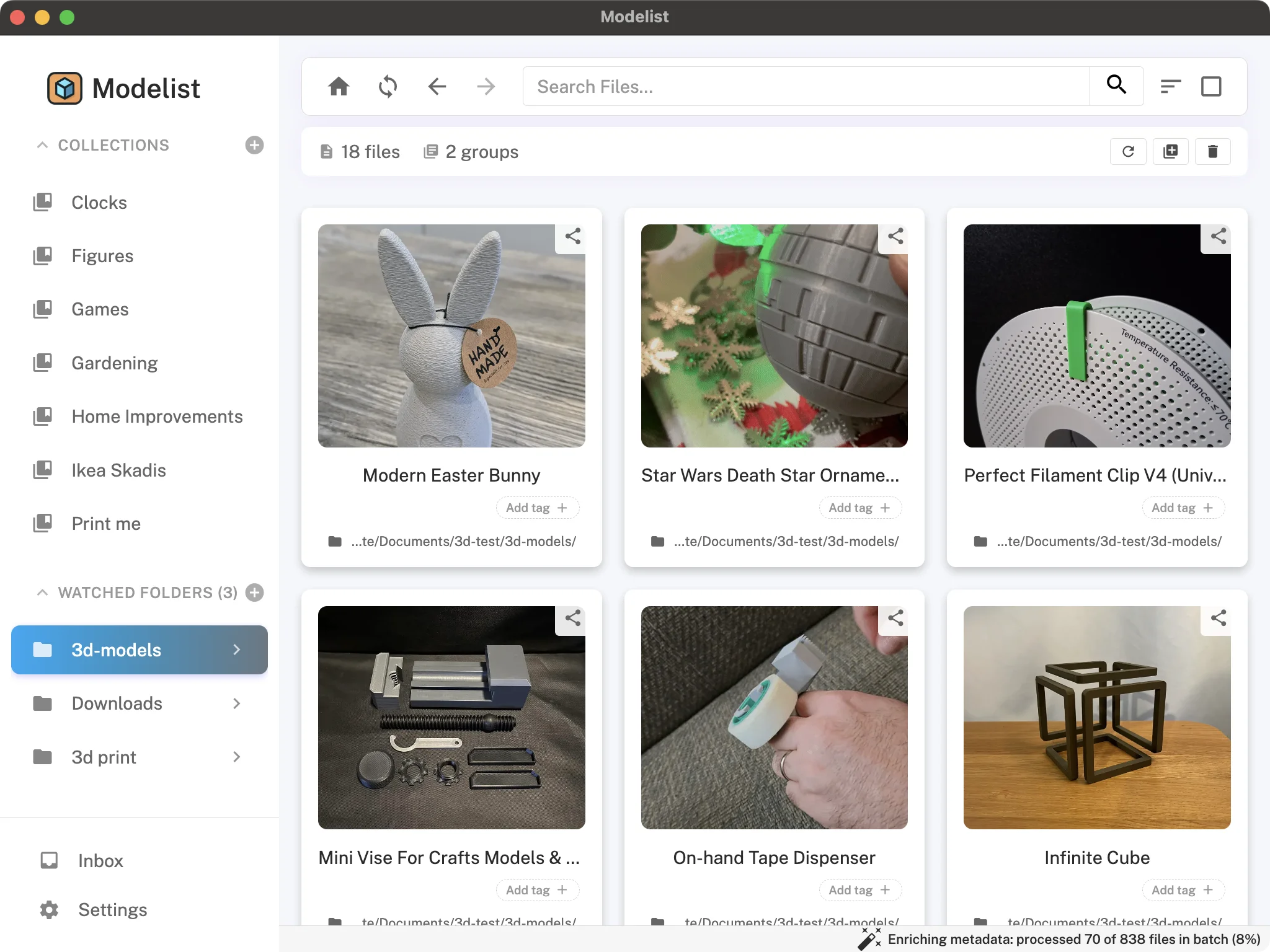
Smart folder scanning
Tell Modelist which folders to watch. New STL, 3MF, OBJ, STEP, SCAD, and ZIP files get indexed automatically, including subfolders.
3D file preview
Built-in viewer renders STL, OBJ, and 3MF natively, Bambu projects included. Multi-colour prints appear in the filaments each part is assigned to, and multi-plate projects step through a plate at a time. Rotate, zoom, inspect before you print.
3MF embedded images
3MF files carry a thumbnail inside them, whatever slicer or site they came from. Modelist pulls it out and uses it as the preview, so those files look right the moment they're indexed.
Archive browsing
Index models inside ZIP, RAR, 7Z, TAR, TAR.GZ, and TAR.BZ2 packages without unzipping anything yourself. Archives appear as locked groups in your library.
Your own thumbnails
Drop an image next to a model with the same name (dragon.stl, dragon.png) and it becomes the thumbnail. An image beside a ZIP becomes the cover for the whole group. Pick one by hand any time.
Source enrichment
Modelist works out where a file was downloaded from, finds the model page, and pulls in the images, description, and metadata - link back to the original included. Paste a URL yourself for anything it can't place.
Dark mode
Light and dark themes with a Settings toggle. Modelist remembers your choice; renders display correctly in both.
Custom render colour
Pick the default colour Modelist uses to render 3D previews - so STLs don't all look like the same blue blob.
OpenSCAD files
.scad files sit in your library like any other model: indexed from folders and archives, searchable, taggable, collectable, with a badge of their own. Install OpenSCAD and they get real rendered thumbnails, shot from the same angle as your STLs so a mixed shelf looks like one shelf.
Fast over the network
Previewing a file inside a ZIP pulls out just that one file instead of loading the whole archive. Over a network drive you wait for one model's worth of traffic, not the entire pack's.
Built for big libraries
Scrolling, filtering, and searching stay quick when your library runs to tens of thousands of files. No spinner every time you change your mind about a filter.
Three layers of organization.
Tags and folders aren't enough once your library hits a few hundred files. Modelist gives you tags, nested collections, and saved searches that maintain themselves.
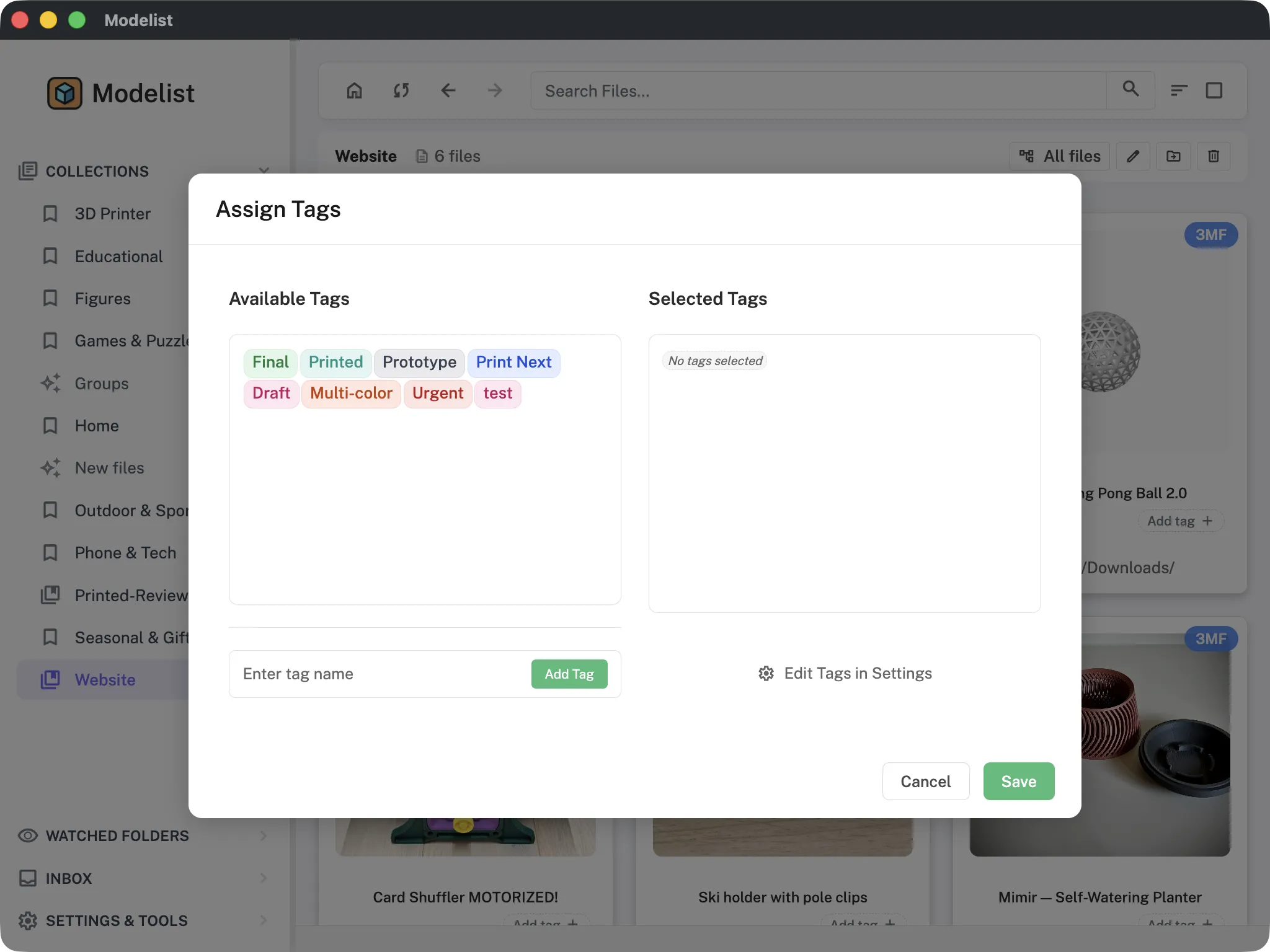
Tags
Custom labels for any criteria. "Print Ready", "Articulated", "Gifts" - whatever shape your library takes.
Collections
Named groupings. Drag files in, or save a search and call it a Collection.
Nested Collections
Build hierarchies as deep as your library demands. Faction → Unit → Variant works fine.
Smart Collections
Save a search and Modelist keeps the result current as your library grows. Live, not snapshot.
Banderole
Customizable status flag for each file. "To Print", "Review", "In progress" - whatever workflow stages you actually use.
Notes
Per-file freeform notes. Print settings, license terms, where you found it, what went wrong last time.
Bulk actions
Select any number of files and tag, collect, re-render thumbnails, set or clear a banderole, or delete - all from one Actions menu. Select a group and it applies to every file inside.
Watched folders
Add, remove, and reorder watched folders any time. Drop a folder from Finder onto the sidebar to add it.
Groups
Manually cluster related files - parts of a multi-piece print, model variants, accessories that go together. Each group can have its own custom thumbnail and be bulk-added to a collection.
Track your workshop.
Keep your printers, filaments, and filament colours catalogued alongside your files. Your slicer already knows most of this - Modelist reads it out of your 3MFs, asks about anything new, and lets you filter by what's actually loaded right now.
Printer list
Track the printers you own. Filter your library by which printer a file is for, or tag files with the printer that worked best.
Materials
One list of the materials you print in, mostly filled in from your slicer files. Every file carries what it was sliced for, so you can pull up everything you print in PETG.
Filament palette
Modelist learns colours from your 3MF imports and groups them into Whites, Reds, Blues, etc. Auto-assign sorts the rest based on hex once you've seeded a few colours per group.
Custom colour groups
Beyond the default colour buckets, create your own groups for specific brands, finishes, or projects.
Read from your slicer
Modelist reads 3MFs from Bambu Studio, Orca Slicer, PrusaSlicer, and SuperSlicer and fills in the printer, materials, and print weight by itself. Works for 3MFs buried inside ZIPs too.
Print tab
Printer, materials, and total weight for a file, in one place. Multi-material prints show what each spool contributed.
Your edits stick
Every field remembers whether it came from the file or from you. A re-scan updates what the slicer knows and leaves what you set by hand alone.
Name aliases
"Bambu PLA Basic" and "PLA Basic Bambu" are the same spool. Map both to one library entry so slicer naming doesn't split your filters in two.
Review queue
Find a printer, material, or colour Modelist hasn't seen before and it waits for you in a review queue instead of being guessed at. Map it to something you own, or add it to the library.
Search like you'd search anything else.
Filenames are useless when you don't remember what you named the file. Modelist searches across names, descriptions, tags, notes, and metadata - and finds duplicates a file manager never will.
Full-text search
Search everything Modelist knows: filename, source description, your notes, your tags, all at once.
Fuzzy search
Toggle fuzzy matching when you can't quite remember what the file was called. Modelist forgives a typo.
Filters
Format, size, date, tags, source platform, banderole, printer, material, colour. Every chip is include, exclude, or off, so you can carve out what you don't want as easily as what you do.
Save as Smart Collection
Got a search you'll run again? Save it. The result list updates as your library grows; you don't.
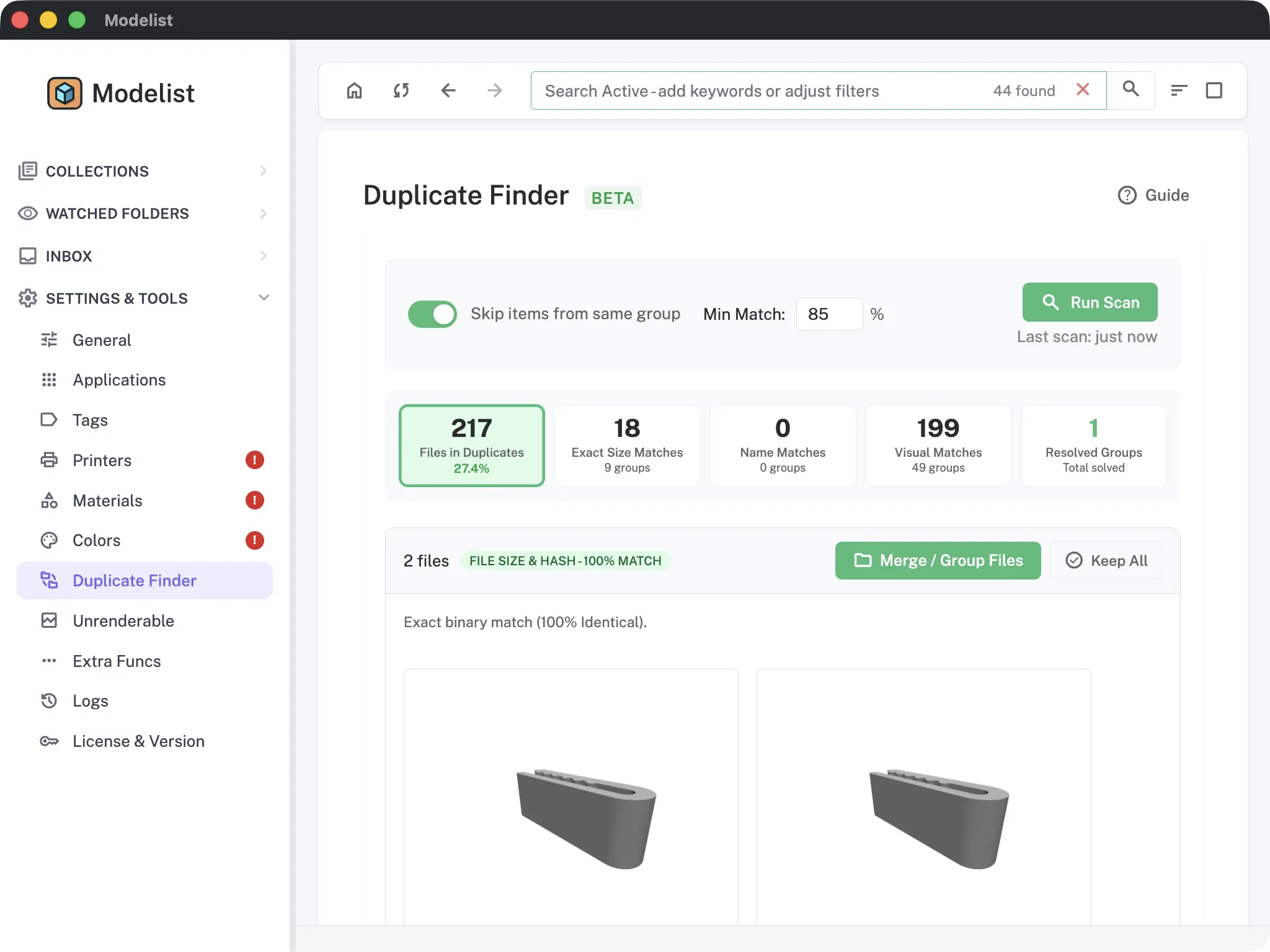
Exact duplicate detection
Byte-exact: identical file content, different folders. The "I downloaded this twice" case.
Heuristic duplicates
Similar filenames + similar sizes. Catches near-duplicates with slightly different names.
Perceptual duplicates
Visual hashing. Catches the same model when someone renamed it or re-exported it - filename-based tools miss this entirely.
Duplicate archives
Not just loose files - the duplicate finder spots whole archives that hold the same models, for when the same pack got downloaded twice under two different names.
Duplicates on the file page
When a scan matches a file against others, a Duplicates tab appears on that file's own page. You see the twin while you're looking at the file, instead of only inside the batch tool.
In / Not in collection
Filter to find files that belong to a collection, or files that haven't been collected yet. Useful for library cleanup.
Open in any slicer.
Modelist is slicer-agnostic. Files open with your OS's default app for each extension, and Open With sends them to anything else - with per-file memory of your choice.
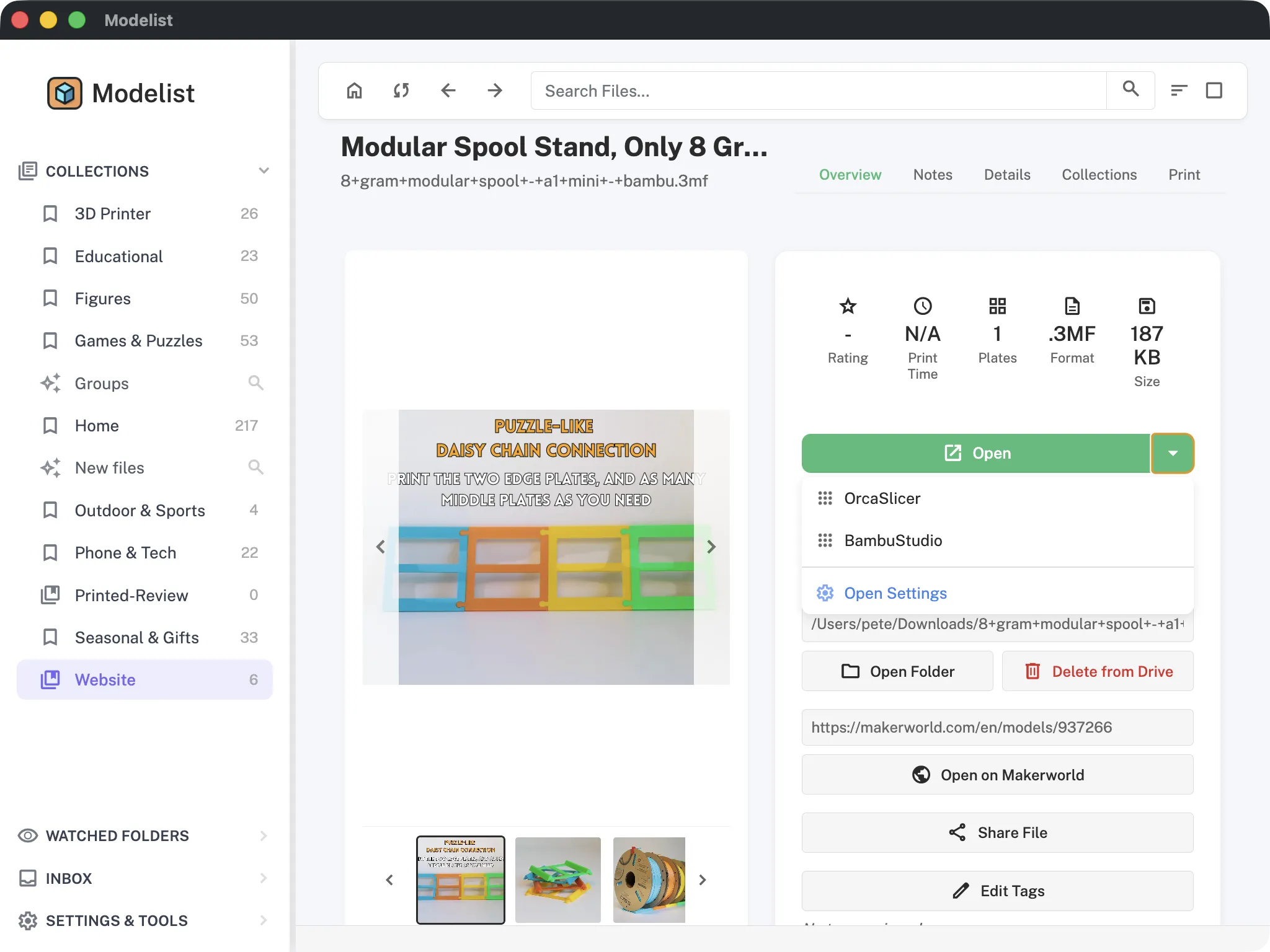
Slicer-agnostic
Modelist doesn't lock you to one slicer. By default it opens files with your OS's default app for each extension. Bambu Studio, PrusaSlicer, OrcaSlicer, Cura, SuperSlicer - all just work. A .scad opens in OpenSCAD instead, since no slicer can read one.
Custom apps
Any application your OS knows about. Open .stl in Blender, .step in Fusion 360, whatever your workflow needs.
Remembers per file
Used Orca for one model and Bambu Studio for another? Modelist remembers and defaults to your last choice for each file.
Multiple slicer instances
Running two copies of the same slicer side-by-side? Supported - pick which instance to send to.
Custom CLI parameters
Pass custom command-line arguments to any app you've added. Run a slicer with your preferred profile, or hand off to a script.
Get models onto your desktop, from anywhere.
The phone half of Modelist does one job: you find a model on your phone, you hit share, it turns up on your desktop. There is no second app to install and no library to browse on mobile - your library stays where your printer and your files are.
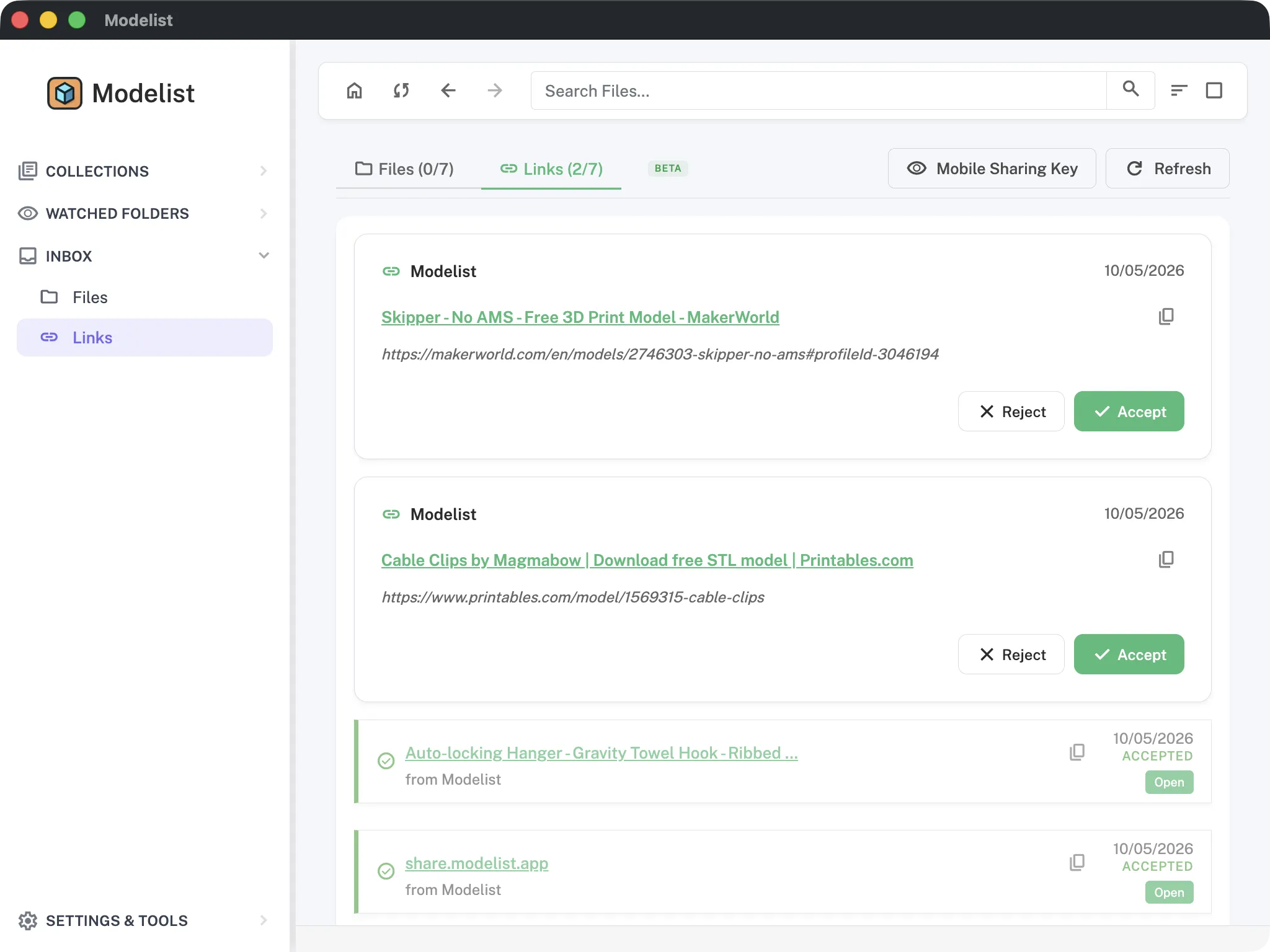
Share from your phone
Found a model while scrolling on your phone? Hit share, pick Modelist, and the link lands in the Inbox on your desktop, waiting for you when you sit down. Works from any app on iOS or Android.
File sharing between users
Send files, or just the metadata, to other Modelist users. It lands looking the way it does in your library: images, description, and tags attached, not a bare STL.
Inbox with accept/decline
All shared files land here first. Review, accept, or decline before anything enters your library. Expired links are tracked too.
Free tier can receive
Free Modelist users can receive shared files even at the 100-file limit. Sending requires a paid license.
QR-code pairing
Pair your phone to your desktop with a QR code. No accounts to set up, no manual ID-typing.
Your files. Your computer. Modelist doesn't change that.
Modelist is a desktop app, not a service. Files never leave your computer unless you explicitly share one. There is no account to create, for any part of it.
100% local
Indexing, previews, search, metadata extraction - all on your machine. No internet required for the core app.
No account
Install, point at folders, use. No signup, no email, no password. Sharing identifies people by email address and nothing more.
Non-destructive indexing
Modelist never moves, renames, or rewrites your files. The only destructive action is delete, and it's a manual choice with a confirmation dialog.
Cloud sharing opt-in
Sharing, both mobile and user-to-user, stays off until you switch it on. You address people by email, and nothing moves unless you send it.
Files survive moves
Reorganize your folders and Modelist still recognizes each file. Tags, notes, custom thumbnails, and collections all come along.
Folders are the source of truth
Modelist's database is metadata only. Stop using it tomorrow and your folders are exactly as you left them.
Works offline
No connection, no problem. Index, preview, search, tag, and open files in your slicer on a plane, in a garage with no wifi, or the week your internet is out.
The part you built by hand, in one file.
Your files came from the internet and you could download them again. The tags, ratings, and collections you layered on top took months. All of that now fits in a single portable backup.
Export your curation
Tags, collections, ratings, groups, printers, materials, colours, and watched folders write out to one backup file. Your 3D files are never copied, so the backup stays small.
Restore anywhere
Import a backup and Modelist rebuilds your library around it. For moving to a new computer, or for getting back to solid ground after a big cleanup goes wrong.
Folder mapping
A backup from another machine lists every watched folder and where it should live now. Folders that still exist are matched for you; the rest you point somewhere or skip.
Thumbnails optional
Leave previews out and the file stays tiny - they simply re-render afterwards. Include them and you get a size estimate before you commit.
Settings stay put
App preferences are never exported, so restoring a backup never drags another machine's window sizes and toggles along with it.
First-class on every desktop OS.
Modelist runs natively on macOS, Windows, and Linux. The mobile companion at share.modelist.app handles phone-to-desktop sharing on iOS and Android.
macOS
Apple Silicon (arm64) and Intel via Universal binary. Distributed as a signed .dmg.
Windows
Signed x64 Setup.exe. ARM build published with releases when supported.
Linux
x86_64 AppImage and amd64 .deb. ARM AppImage published with releases when supported.
Four languages
English, German, Spanish, and French. If your computer is already set to one of them, Modelist starts in it - nothing to configure. Switch any time in Settings.
Your phone, for sending
share.modelist.app is a web page you reach through the iOS or Android share sheet, not a mobile version of Modelist. It sends links to your desktop; the library itself lives on your computer. Nothing to install from an app store.
One-time payment
€20 for v1 (every v1.x update), €60 for lifetime (every major release forever). No subscription.
Free tier
Up to 100 files, no time limit. Try Modelist on your real library before buying.
Auto-updates
Modelist updates itself in the background. New version drops, you get a notification next time you launch.
Built-in changelog
Every release ships with notes inside the app. Open Settings → License & Version to see what's new.
First-run onboarding
A welcome screen guides first-time users through pointing Modelist at folders. No empty-app blank-stare moment.
Try it on your real library.
Free for 100 files, no time limit. €60 once when you outgrow it. Or never. Up to you.